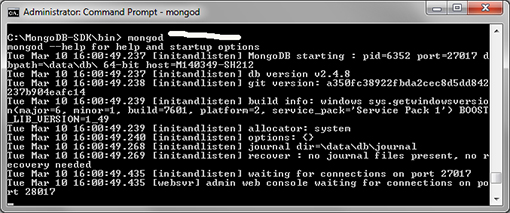
C:\data\db (one time only),
cd into the bin folder of the Mongo DB directory such as C:\MongoDB-SDK\bin to start the NoSQL database server, and
mongod.

mongo, an Interactive JavaScript Shell Interface to MongoDB.mongo command, as follows:
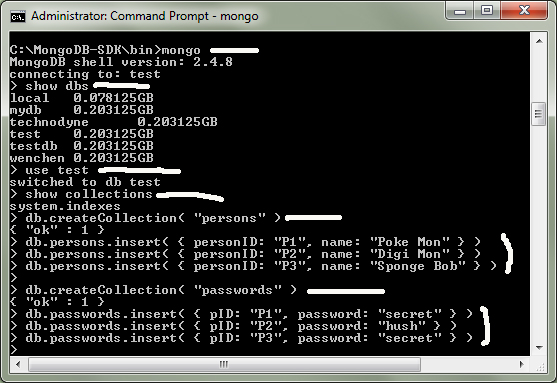
persons and passwords and enter three documents for each as follows:
> db.createCollection( "persons" )
> db.persons.insert( { personID: "P1", name: "Poke Mon" } )
> db.persons.insert( { personID: "P2", name: "Digi Mon" } )
> db.persons.insert( { personID: "P3", name: "Sponge Bob" } )
>
> db.createCollection( "passwords" )
> db.passwords.insert( { pID: "P1", password: "secret" } )
> db.passwords.insert( { pID: "P2", password: "hush" } )
> db.passwords.insert( { pID: "P3", password: "secret" } )
Start ⇒ All Programs
⇒ Visual Studio 2013
mongocsharpdriver from nuget using package manager console by selecting the following options:
TOOLS ⇒ NuGet Package Manager
⇒ Package Manager Console
and enter the following command:
PM> Install-Package mongocsharpdriver

web.config file inside <configuration></configuration>:
<appSettings>
<add key="connectionString" value="Server=localhost:27017"/>
</appSettings>
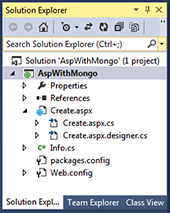
create.aspx page with a textbox, a button, and a label.
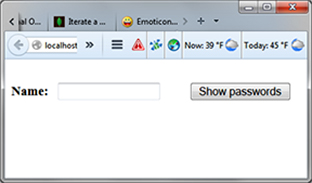
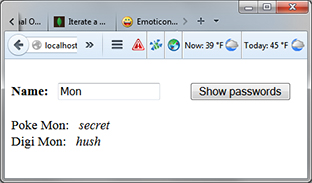
The following show the web interfaces and corresponding code from Connecting MongoDB with ASP.NET:
|
|
|
⇒ |
|
<%@ Page Language="C#" AutoEventWireup="true" CodeBehind="Create.aspx.cs" Inherits="AspWithMongo.Create" %>
<!DOCTYPE html>
<html xmlns="http://www.w3.org/1999/xhtml">
<head runat="server">
<title>ASP.NET with Mongo</title>
</head>
<body>
<form id="form1" runat="server">
<asp:TextBox ID="name1" runat="server" Width="120px">
</asp:TextBox>
<asp:Button ID="showButton" runat="server" Text="Show passwords" OnClick="showButton_Click" />
<asp:Label ID="pLabel" runat="server"></asp:Label>
</form>
</body>
</html>
using MongoDB;
using MongoDB.Driver;
using MongoDB.Driver.Builders;
using System;
using System.Collections.Generic;
using System.Configuration;
using System.Linq;
using System.Web;
using System.Web.UI;
using System.Web.UI.WebControls;
namespace AspWithMongo {
public partial class Create : System.Web.UI.Page {
string pwords = "";
protected void Page_Load( object sender, EventArgs e ) {
}
protected void showButton_Click( object sender, EventArgs e ) {
MongoServer server = MongoServer.Create( ConfigurationManager.AppSettings["connectionString"] );
MongoDatabase myDB = server.GetDatabase( "test" );
MongoCollection<Info> Persons = myDB.GetCollection<Info>( "persons" );
MongoCollection<Info1> Passwords = myDB.GetCollection<Info1>( "passwords" );
foreach ( Info Aperson in Persons.Find( Query.Matches( "name", name1.Text ) ) ) {
foreach ( Info1 Apword in Passwords.Find( Query.EQ( "pID", Aperson.personID ) ) )
pwords = pwords + " " + Aperson.name + ": <i>" + Apword.password + "</i>";
pLabel.Text = pwords;
}
}
}
}
using MongoDB.Bson;
using System;
using System.Collections.Generic;
using System.Linq;
using System.Web;
namespace AspWithMongo {
public class Info {
public ObjectId _id { get; set; }
public string personId { get; set; }
public string name { get; set; }
}
public class Info1 {
public ObjectId _id { get; set; }
public string pID { get; set; }
public string password { get; set; }
}
}