(Unlike other languages, using others’ assembly code is obvious.)
Development Requirements
When start developing the exercise, follow the two requirements below:
- Have to use the MIPS (Microprocessor without Interlocked Pipeline Stages) assembly language to develop the exercise.
- Use the MARS (MIPS Assembler and Runtime Simulator) to test your exercise. The MARS will also be used by the instructor to grade exercises.
Soft Due Date† and Submission Method
On or before Thursday, February 19, 2026 and upload the source code (no documentation needed) to the section of “COVID-19 Exams, Homeworks, & Programming Exercises” of Blackboard.
|
†Since related topics may not be covered completely by the due date, no penalty will be applied if submitted after the due date.
However, you may lag behind if you are not able to submit it by then.
In addition, the Exam I will cover the materials from the Programming Exercise I.
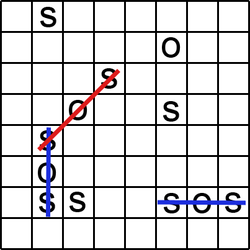
Objective Design and implement a MIPS assembly program, which displays a one-player, 6×6 SOS game. The final program is around 150 lines without counting the declarations of data structures. The purpose of this exercise is to get students ready for assembly programming and the second exercise, playing an SOS game. |
|
Rules of an SOS Game
It is a board game for two players who take turns in putting the pieces S and O on empty cells of a board. Before play begins, a square grid of at least 3×3 squares in size is drawn. Players take turns to add either an ‘S’ or an ‘O’ to any square, with no requirement to use the same letter each turn.
| The object of the game is for each player to attempt to create the straight sequence S-O-S among connected squares (either diagonally, horizontally, or vertically), and to create as many such sequences as they can. If a player succeeds in creating an SOS, that player immediately takes another turn, and continues to do so until no SOS can be created on their turn. Otherwise turns alternate between players after each move. Keeping track of who made which SOSs can be done by, e.g., one player circling their SOSs and the other player drawing a line through theirs. Once the grid has been filled up, the winner is the player who made the most SOSs. If the grid is filled up and the number of SOSs for each player is the same, then the game is a draw. |
Requirements
The 6×6 SOS game includes the following requirements:
- (Displaying board: 20%)
The board consists of two parts: the game board (left) and the index board (right) as follows:
. . . . . . ⇒ 0 1 2 3 4 5 . . . . . . ⇒ 6 7 8 9 a b . . . . . . ⇒ c d e f g h . . . . . . ⇒ i j k l m n . . . . . . ⇒ o p q r s t . . . . . . ⇒ u v w x y z - (Marking the moves: 20%)
Mark a move by entering a piece (either ‘S’ or ‘O’) and an index.
For example, if the first move consists of the piece ‘S’ and an index
k, the board is displayed as follows:. . . . . . ⇒ 0 1 2 3 4 5 . . . . . . ⇒ 6 7 8 9 a b . . . . . . ⇒ c d e f g h . . . . . . ⇒ i j k l m n . . . . . . ⇒ o p q r s t . . . . . . ⇒ u v w x y z⇓ S at k
. . . . . . ⇒ 0 1 2 3 4 5 . . . . . . ⇒ 6 7 8 9 a b . . . . . . ⇒ c d e f g h . . S . . . ⇒ i j k l m n . . . . . . ⇒ o p q r s t . . . . . . ⇒ u v w x y z - (Next move: 20%) Continue with the next move after asking the user to pick ‘y’ or ‘n’.
- (Counting how many SOSs: 20%) List how many SOSs before start a new game or stop playing.
- (New game: 20%) Start a new game after asking the user to pick ‘y’ or ‘n’.
- Ignore the result (win/loss). The game ends when the user requests for no new game.
Programming Hints
The four essential components of software are (i) algorithms, (ii) data structures, (iii) programming languages, and (iv) code, where algorithms are the most critical one. In addition, using appropriate data structures could save a great deal of coding work, especially for assembly coding. The following hints are from the instructor and you do not necessarily have to use them:
- To represent the game board, a 6×6 grid:
. . . . . . ⇒ 0 1 2 3 4 5 . . . . . . ⇒ 6 7 8 9 a b . . . . . . ⇒ c d e f g h . . . . . . ⇒ i j k l m n . . . . . . ⇒ o p q r s t . . . . . . ⇒ u v w x y zthe instructor uses the following string:board: .ascii "\n\n . . . . . . 0 1 2 3 4 5" .ascii "\n . . . . . . 6 7 8 9 a b" .ascii "\n . . . . . . c d e f g h" .ascii "\n . . . . . . i j k l m n" .ascii "\n . . . . . . o p q r s t" .asciiz "\n . . . . . . u v w x y z\n"Also, the instructor uses the following command to represent the offsets:offset: .half 6, 8, 10, 12, 14, 16 .half 39, 41, 43, 45, 47, 49 .half 72, 74, 76, 78, 80, 82 .half 105, 107, 109, 111, 113, 115 .half 138, 140, 142, 144, 146, 148 .half 171, 173, 175, 177, 179, 181where
- the numbers are offsets (not assembly code),
- the new line, ‘\n’, is one byte long, and
- each offset uses 2 bytes because the range of 1 byte, [-128 – 127], is not enough for a number ≥ 128.
Convert the character indexes 0–9a–z to integer indexes 0–35, respectively. Assuming the converted index is in$t0, the following code then puts the piece ‘S’ at that location:mul $t0, $t0, 2 # Each offset is two-byte long. lh $t1, offset($t0) # Load $t1 with the offset of the index $t0. li $t2, 'S' # Put the piece ‘S’ in $t2. sb $t2, board($t1) # Put the piece at the location, board+offset. - Since the grading is mainly based on the testing results without considering much about performance and algorithms, the instructor uses the following data structure to count the number of SOSs created.
All possible SOSs are listed as follows‡:
where each three characters are the indexes of the three pieces in a row. For example, the SOS #70 is an SOS sequence ifSOS: .ascii "012" # 0 .ascii "07e" # 1 .ascii "06c" # 2 .ascii "123" # 3 .ascii "18f" # 4 .ascii "17d" # 5 .ascii "234" # 6 .ascii "29g" # 7 .ascii "28e" # 8 .ascii "27c" # 9 .ascii "345" # 10 .ascii "3ah" # 11 .ascii "39f" # 12 .ascii "38d" # 13 .ascii "4ag" # 14 .ascii "49e" # 15 .ascii "5bh" # 16 .ascii "5af" # 17 .ascii "678" # 18 .ascii "6dk" # 19 .ascii "6ci" # 20 .ascii "789" # 21 .ascii "7el" # 22 .ascii "7dj" # 23 .ascii "89a" # 24 .ascii "8fm" # 25 .ascii "8ek" # 26 .ascii "8di" # 27 .ascii "9ab" # 28 .ascii "9gn" # 29 .ascii "9fl" # 30 .ascii "9ej" # 31 .ascii "agm" # 32 .ascii "afk" # 33 .ascii "bhn" # 34 .ascii "bgl" # 35 .ascii "cde" # 36 .ascii "cjq" # 37 .ascii "cio" # 38 .ascii "def" # 39 .ascii "dkr" # 40 .ascii "djp" # 41 .ascii "efg" # 42 .ascii "els" # 43 .ascii "ekq" # 44 .ascii "ejo" # 45 .ascii "fgh" # 46 .ascii "fmt" # 47 .ascii "flr" # 48 .ascii "fkp" # 49 .ascii "gms" # 50 .ascii "glq" # 51 .ascii "hnt" # 52 .ascii "hmr" # 53 .ascii "ijk" # 54 .ascii "ipw" # 55 .ascii "iou" # 56 .ascii "jkl" # 57 .ascii "jqx" # 58 .ascii "jpv" # 59 .ascii "klm" # 60 .ascii "kry" # 61 .ascii "kqw" # 62 .ascii "kpu" # 63 .ascii "lmn" # 64 .ascii "lsz" # 65 .ascii "lrx" # 66 .ascii "lqv" # 67 .ascii "msy" # 68 .ascii "mrw" # 69 .ascii "ntz" # 70 .ascii "nsx" # 71 .ascii "opq" # 72 .ascii "pqr" # 73 .ascii "qrs" # 74 .ascii "rst" # 75 .ascii "uvw" # 76 .ascii "vwx" # 77 .ascii "wxy" # 78 .ascii "xyz" # 79
board(n) = 'S' board(t) = 'O' board(z) = 'S'‡Note that the instructor has tried his best to make the list complete, but could not 100% guarantee its correctness or completeness. - Using subroutines can reduce repeated code.
An example of how to call the subroutine
routine1is given as follows:jal routine1 # Jump and link to routine1 next: ...where the labelnextis not required. The following command in the subroutineroutine1will return the control back to thenext, the next command after the“ jal routine1”:routine1: ... jr $ra # Jump to the contents of $rawhere the return address is saved in the register$31or$ra - When a subroutine calls another subroutine, the return address,
$31or$ra, has to be saved before making the call. The return address is restored after the called subroutine returns. The instructor uses the runtime stack to save the return addresses, so deep subroutine calls are supported. Use the following two commands to push the$rato the runtime stack:subu $sp, $sp, 4 # Decrement the $sp to make space for $ra. sw $ra, ($sp) # Push the return address, $ra.and use the following two commands to pop up the$rafrom the runtime stack:lw $ra, ($sp) # Pop the return address, $ra. addu $sp, $sp, 4 # Increment the $sp.You may also use the runtime stack to save the register and variable values. - Sample code of checking an SOS is given below for your reference:
SOS.asm# # Checking an SOS # .data p1: .asciiz "\n\nStart Checking an SOS." p2: .asciiz "\nEnter the next move: [0..z] " p3: .asciiz "\nNumber of SOSs: " board: .ascii "\n\n . . . . . . 0 1 2 3 4 5" .ascii "\n . . . . . . 6 7 8 9 a b" .ascii "\n . . S O . . c d e f g h" .ascii "\n . . . . . . i j k l m n" .ascii "\n . . . . . . o p q r s t" .asciiz "\n . . . . . . u v w x y z\n" offset: .half 6, 8, 10, 12, 14, 16 .half 39, 41, 43, 45, 47, 49 .half 72, 74, 76, 78, 80, 82 .half 105, 107, 109, 111, 113, 115 .half 138, 140, 142, 144, 146, 148 .half 171, 173, 175, 177, 179, 181 SOS: .ascii "012" # 0 .ascii "07e" # 1 .ascii "06c" # 2 .ascii "123" # 3 .ascii "18f" # 4 .ascii "17d" # 5 .ascii "234" # 6 .ascii "29g" # 7 .ascii "28e" # 8 .ascii "27c" # 9 .ascii "345" # 10 .ascii "3ah" # 11 .ascii "39f" # 12 .ascii "38d" # 13 .ascii "4ag" # 14 .ascii "49e" # 15 .ascii "5bh" # 16 .ascii "5af" # 17 .ascii "678" # 18 .ascii "6dk" # 19 .ascii "6ci" # 20 .ascii "789" # 21 .ascii "7el" # 22 .ascii "7dj" # 23 .ascii "89a" # 24 .ascii "8fm" # 25 .ascii "8ek" # 26 .ascii "8di" # 27 .ascii "9ab" # 28 .ascii "9gn" # 29 .ascii "9fl" # 30 .ascii "9ej" # 31 .ascii "agm" # 32 .ascii "afk" # 33 .ascii "bhn" # 34 .ascii "bgl" # 35 .ascii "cde" # 36 .ascii "cjq" # 37 .ascii "cio" # 38 .ascii "def" # 39 .ascii "dkr" # 40 .ascii "djp" # 41 .ascii "efg" # 42 .ascii "els" # 43 .ascii "ekq" # 44 .ascii "ejo" # 45 .ascii "fgh" # 46 .ascii "fmt" # 47 .ascii "flr" # 48 .ascii "fkp" # 49 .ascii "gms" # 50 .ascii "glq" # 51 .ascii "hnt" # 52 .ascii "hmr" # 53 .ascii "ijk" # 54 .ascii "ipw" # 55 .ascii "iou" # 56 .ascii "jkl" # 57 .ascii "jqx" # 58 .ascii "jpv" # 59 .ascii "klm" # 60 .ascii "kry" # 61 .ascii "kqw" # 62 .ascii "kpu" # 63 .ascii "lmn" # 64 .ascii "lsz" # 65 .ascii "lrx" # 66 .ascii "lqv" # 67 .ascii "msy" # 68 .ascii "mrw" # 69 .ascii "ntz" # 70 .ascii "nsx" # 71 .ascii "opq" # 72 .ascii "pqr" # 73 .ascii "qrs" # 74 .ascii "rst" # 75 .ascii "uvw" # 76 .ascii "vwx" # 77 .ascii "wxy" # 78 .ascii "xyz" # 79 .text .globl main # ########################## Main Program ####################### # main: # Print the Prompt p1, greeting. la $a0, p1 li $v0, 4 syscall # Print the board. la $a0, board li $v0, 4 syscall # Read the next move. la $a0, p2 li $v0, 4 syscall li $v0, 12 syscall # Check the move. blt $v0, '0', L1 bgt $v0, '9', L1 sub $t0, $v0, '0' j L2 L1: sub $t0, $v0, 'a' add $t0, $t0, 10 # Mark the board. L2: mul $t0, $t0, 2 # Each offset is two-byte long. lh $t1, offset($t0) # Load $t1 with the offset of the index $t0. li $t2, 'S' # Put the piece ‘S’ in $t2. sb $t2, board($t1) # Put the piece at the location, board+offset. la $a0, board li $v0, 4 syscall move $t0, $0 # $t0: SOS index [0..239] where 239 = 3*80 - 1 move $t1, $0 # $t1: SOS range [0..79] move $t2, $0 # $t2: SOS # # Checking 'S' L3: lb $a0, SOS($t0) jal C2I mul $t3, $a0, 2 lh $t4, offset($t3) lb $t3, board($t4) beq $t3, 'S', L4 add $t0, $t0, 2 j L6 # Checking 'O' L4: add $t0, $t0, 1 lb $a0, SOS($t0) jal C2I mul $t3, $a0, 2 lh $t4, offset($t3) lb $t3, board($t4) beq $t3, 'O', L5 add $t0, $t0, 1 j L6 # Checking 'S' L5: add $t0, $t0, 1 lb $a0, SOS($t0) jal C2I mul $t3, $a0, 2 lh $t4, offset($t3) lb $t3, board($t4) bne $t3, 'S', L6 add $t2, $t2, 1 # An SOS found # Checking next SOS L6: add $t0, $t0, 1 add $t1, $t1, 1 ble $t1, 79, L3 # Print the SOS #. la $a0, p3 li $v0, 4 syscall move $a0, $t2 li $v0, 1 syscall # End of program End: li $v0, 10 syscall # ############## Convert character [0..z] to integer [0..35]. ################## # # Input: $a0 (character [0..z]) # Output: $a0 (integer [0..35]) # Comment: The runtime stack is not needed. # C2I: subu $sp, $sp, 4 # Decrement the $sp to make space for $ra. sw $ra, ($sp) # Push the return address, $ra. blt $a0, '0', L10 bgt $a0, '9', L10 sub $a0, $a0, '0' j L11 L10: sub $a0, $a0, 'a' add $a0, $a0, 10 lw $ra, ($sp) # Pop the return address, $ra. addu $sp, $sp, 4 # Increment the $sp. L11: jr $raAn Example of SOS.asmExecutionStart Checking an SOS. . . . . . . 0 1 2 3 4 5 . . . . . . 6 7 8 9 a b . . S O . . c d e f g h . . . . . . i j k l m n . . . . . . o p q r s t . . . . . . u v w x y z Enter the next move: [0..z] m . . . . . . 0 1 2 3 4 5 . . . . . . 6 7 8 9 a b . . S O . . c d e f g h . . . . S . i j k l m n . . . . . . o p q r s t . . . . . . u v w x y z Number of SOSs: 0 -- program is finished running -- Start Checking an SOS. . . . . . . 0 1 2 3 4 5 . . . . . . 6 7 8 9 a b . . S O . . c d e f g h . . . . . . i j k l m n . . . . . . o p q r s t . . . . . . u v w x y z Enter the next move: [0..z] g . . . . . . 0 1 2 3 4 5 . . . . . . 6 7 8 9 a b . . S O S . c d e f g h . . . . . . i j k l m n . . . . . . o p q r s t . . . . . . u v w x y z Number of SOSs: 1 -- program is finished running --
†The italic, white text with a navy background color is entered by users.
‡Notice the subroutine is not necessary. It is to show how to use subroutines and runtime stack.
Execution Examples
The following list shows some execution examples:
|
|
|
Possible Instructions to Be Used
The following directives and instructions may be used in this exercise, but you are not limited to them. For instruction syntax, check MIPS Instruction Reference.
| No. | Directive | Description | |
|---|---|---|---|
| 1 | .ascii "string" |
Allocating space for string | |
| 2 | .asciiz "string" |
Allocating space for string, NULL terminated | |
| 3 | .byte |
Allocating space for a byte | |
| 4 | .data |
Beginning of data section | |
| 5 | .globl name |
Making the following name be a global symbol | |
| 6 | .half |
Allocating space for a half word (two bytes) | |
| 7 | .space n |
Allocating n bytes of space |
|
| 8 | .text |
Beginning of text section | |
| No. | Instruction | Operation | Description |
| 1 | add rd, rs, rt |
rd = rs + rt |
Add;rd: destination register, rs: first source register, and rt: second source register or immediate value.Check MIPS Registers and Usage Convention. |
| 2 | addu rd, rs, rt |
rd = rs + rt (no overflow) |
Add unsigned |
| 3 | beq rs, rt, label |
if rs==rt then goto label |
Branch if equal to |
| 4 | bgt rs, rt, label |
if rs>rt then goto label |
Branch if greater than |
| 5 | ble rs, rt, label |
if rs≤rt then goto label |
Branch if less than or equal to |
| 6 | blt rs, rt, label |
if rs<rt then goto label |
Branch if less than |
| 7 | bne rs, rt, label |
if rs≠rt then goto label |
Branch if not equal to |
| 8 | j label |
jump to label |
Jump |
| 9 | jal label |
jump to label and save the return address in $31 or $ra |
Jump and link |
| 10 | jr rs |
jump to [rs]; [ ]: contents of |
Jump and link |
| 11 | la rd, mem |
rd = address( mem ) |
Load address |
| 12 | lb rd, mem |
rd = mem |
Load byte |
| 13 | lh rd, mem |
rd = mem |
Load half word |
| 14 | li rd, imm |
rd = imm |
Load immediate |
| 15 | lw rd, mem |
rd = mem |
Load word |
| 16 | move rd, rs |
rd = rs |
Move register |
| 17 | mul rd, rs, rt |
rd = rs × rt |
Multiply |
| 18 | sb rs, mem |
mem = rs |
Store byte |
| 19 | sub rd, rs, rt |
rd = rs - rt |
Subtract |
| 20 | subu rd, rs, rt |
rd = rs - rt (no overflow) |
Subtract unsigned |
| 21 | sw rs, mem |
mem = rs |
Store word |
| 22 | syscall |
|
System call; check System Services. |
The following table lists some System Services provided by the MARS:
| Service | Code in $v0 |
Arguments | Result |
|---|---|---|---|
| print_int | 1 | $a0 = integer to be printed |
|
| print_float | 2 | $f12 = float to be printed |
|
| print_double | 3 | $f12 = double to be printed |
|
| print_string | 4 | $a0 = address of string in memory |
|
| read_int | 5 | integer returned in $v0 |
|
| read_float | 6 | float returned in $v0 |
|
| read_double | 7 | double returned in $v0 |
|
| read_string | 8 | $a0 = address of string input buffer$a1 = length of string buffer (n) |
|
| malloc | 9 | $a0 = amount |
address in $v0 |
| exit | 10 | ||
| print character | 11 | $a0 = character to be printed |
|
| read character | 12 | character returned in $v0 |
Evaluations
The following features will be considered when grading:
- Specifications:
- The instructor has provided the exercise specifications as thoroughly as possible. If you are confused about the specifications, you should ask in advance. Study the specifications very carefully. No excuses for misunderstanding or missing parts of the specifications after grading.
- The specifications may not be possible to cover every detail. You are free to implement the issues not mentioned in the specifications, but the implementations should make sense. Implemented functions lacking common sense may cause the instructor to grade your exercise mistakenly, and thus lower your grade.
- The exercise must meet the specifications. However, exercises with functions exceeding the specifications will not receive extra credits.
- Grading:
- This exercise will be graded after the source code is submitted. Students take full responsibility if the code does not work.
- The MARS simulator will be used to grade exercises. Make sure your exercise works on MARS.
- Before submitting the exercise, test it comprehensively. Absolutely no extra points will be granted after grading.
- A set of test data will be used to test the exercises of all students. The grades are primarily based on the results of testing. Other factors such as performance, programming styles, algorithms, and data structures will be only considered minimally.
- Unless specified, no error checking is required.
- The total weight of exercises is 20% (10% each) of the final grade.
- Though Exercise II covers parts of Exercise I, you still have to submit both exercises separately. One exercise will not be counted twice.
- The instructor will inform you the exercise evaluations by emails or Blackboard after grading.
- Comments:
- According to a study, students in computer-science courses learn much more by building medium/large-scale exercises instead of many small-scale test programs, which give fragmented knowledge contrary to solid understanding of the language.
- Time management is critical for software development. If you are not able to complete the exercises, show whatever you have accomplished, so the instructor can give partial credit to your exercises.
|
“We used to play spin the bottle when I was a kid,” says comedy writer Gene Perret. “A girl would spin the bottle pointed to you when it stopped, the girl could either kiss you or give you a nickel. By the time I was 14, I owned my own house.” |